> For the complete documentation index, see [llms.txt](https://help.dollarlabs.io/llms.txt). Markdown versions of documentation pages are available by appending `.md` to page URLs; this page is available as [Markdown](https://help.dollarlabs.io/dollarlabs-ultimate-discounts/unified-discount-engine-v2/discount-types/fixed-amount-off-per-currency.md).
# Fixed amount off per currency
### Overview
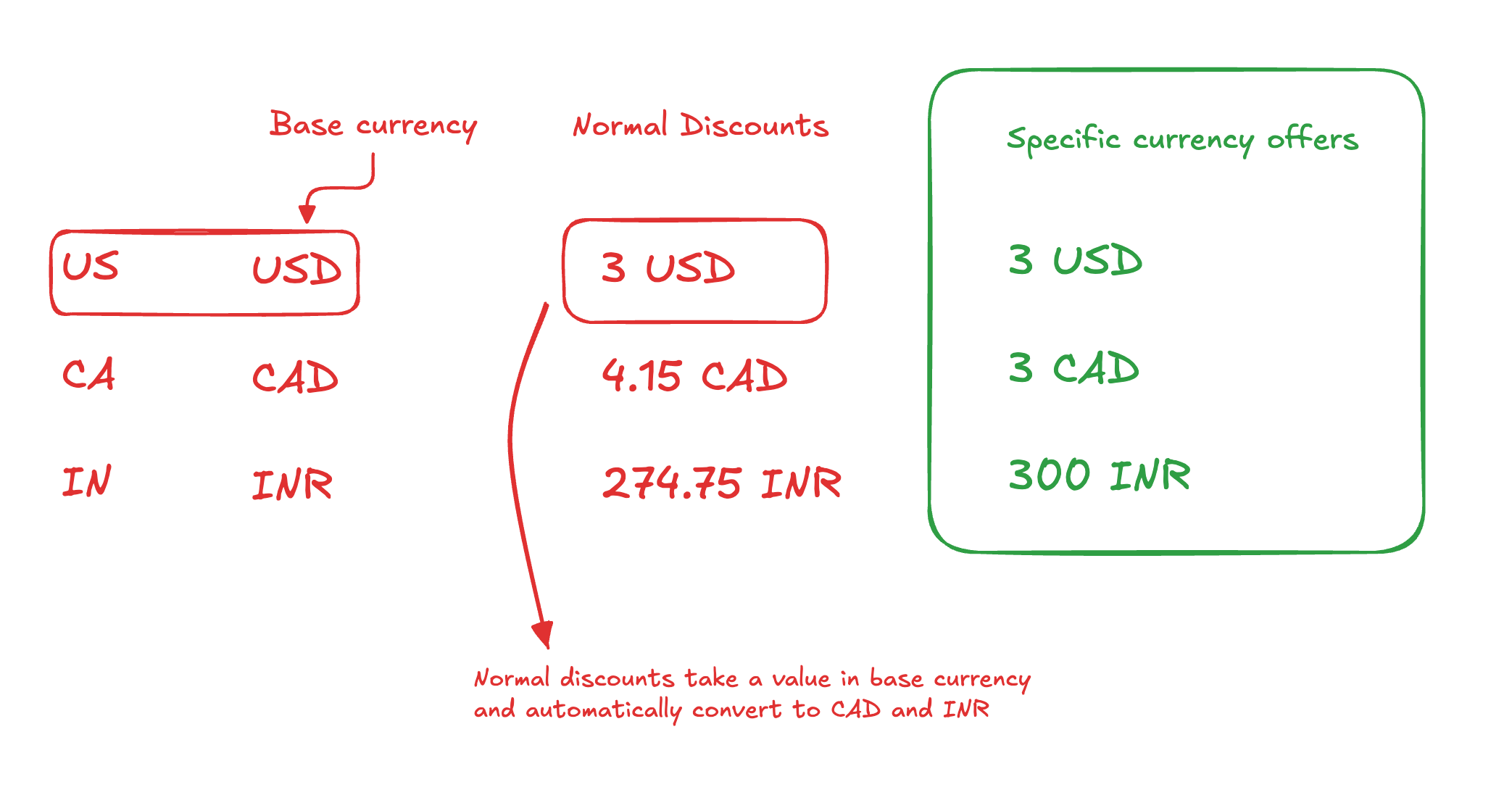
When running a multi-currency or multi-market Shopify store, standard fixed discounts can behave unexpectedly.
For example:
* You create a **$10 USD off** discount
* A customer checks out in **Canada**
* Shopify automatically converts **$10 USD → CAD**
* The final discount value changes based on exchange rates
This is the default Shopify behavior and works well in many cases — but it breaks down when you want **precise, market-specific pricing**.
To solve this, DollarLabs introduces **Currency-Specific Discounts** using a new discount type:
> **Fixed Amount per Currency**
This allows you to define **exact discount values per currency**, without relying on automatic conversions.
{% embed url="" %}
***
### What Is “Fixed Amount per Currency”?
**Fixed Amount per Currency** lets you specify *how much discount should apply in each currency*, independently.
Example:
* 🇺🇸 United States → **$3 USD off**
* 🇨🇦 Canada → **$3 CAD off**
* 🇮🇳 India → **₹300 INR off**
Each customer sees the correct discount **based on their checkout currency**, not a converted value.
***
### Supported Discount Types
This discount type works across all unified discount categories:
* **Product discounts** (per item)
* **Order discounts**
* **Shipping discounts**
The behaviour remains consistent—only the discount amount changes based on currency.
***
### How to Create a Currency-Specific Discount
#### Step 1: Go to Unified Discounts
1. Open the app
2. Navigate to **Unified Discounts**
3. Click **Create Discount**
***
#### Step 2: Choose the Discount Type
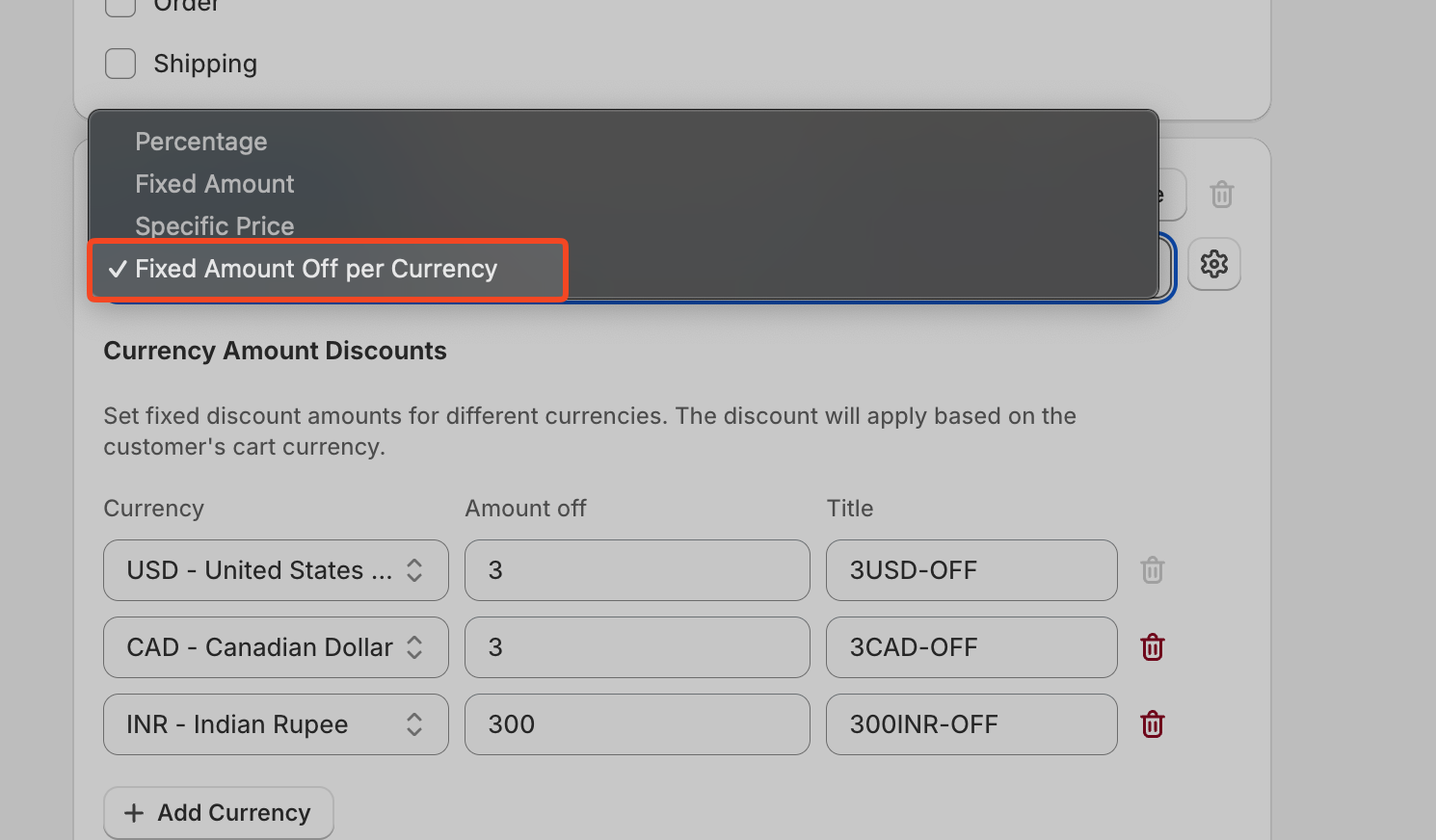
When selecting the discount type, choose:
> **Fixed Amount per Currency**
This option appears alongside the standard fixed and percentage discounts.
***
#### Step 3: Configure Currency Values
You’ll now be able to:
* Add **multiple currencies**
* Define the **exact discount amount for each currency**
Example configuration:
* USD → 3
* CAD → 3
* INR → 300
You can add as many currencies as your store supports.
***
#### Step 4: Complete the Discount Setup
Configure the rest of the discount like any normal unified discount:
* Eligible products / collections
* Usage limits
* Customer eligibility
* Combinability rules
Save the discount when done.
***
### How It Works at Checkout
The discount automatically adapts based on the customer’s market and checkout currency.
Example:
* Customer selects a **Canada** shipping address\
→ Discount shows **$3 CAD off per unit**
* Customer adds **2 units**\
→ Discount becomes **$6 CAD**
* Customer switches to **US**\
→ Discount instantly updates to **$3 USD per unit**
* Customer switches to **India**\
→ Discount updates to **₹300 INR per unit**
No conversion math. No rounding issues. No surprises.
***
### Why Use Currency-Specific Discounts?
* Avoid exchange-rate distortions
* Maintain **pricing consistency across regions**
* Run clean, predictable regional promotions
* Simplify discount logic for global stores
* Full control over per-market offers
***
### Use Cases
* Global promotions with equal *perceived value*
* Market-specific pricing strategies
* High-volume stores where conversion rounding matters
* International brands running localized campaigns
***
### Footnotes
Currency-specific discounts are part of the **Unified Discount Architecture** and are fully compatible with existing discount logic.
If you have a specific use case or need help configuring this for your store, feel free to reach out.\
We’re happy to help you get it live.