> For the complete documentation index, see [llms.txt](https://help.dollarlabs.io/llms.txt). Markdown versions of documentation pages are available by appending `.md` to page URLs; this page is available as [Markdown](https://help.dollarlabs.io/dollarlabs-ultimate-discounts/examples/get-usd60-off-on-each-item-when-purchased-in-pairs.md).
# Get $60 off on each item when purchased in pairs
This guide walks you through how to set up a discount where customers receive **$60 off on each item** in a group **only when purchased in pairs**. This is perfect for promotions like “Buy 2, get $120 off” (i.e., $60 off per item, in sets of 2).
Here's a quick video recording of the offer!
{% embed url="" %}
***
#### ✅ Discount Goal
> **Get $60 off each item when bought in pairs.**\
> If a customer buys 2, 4, 6… items from a specific collection, they get $60 off **per item**.
***
## Step-by-Step Setup
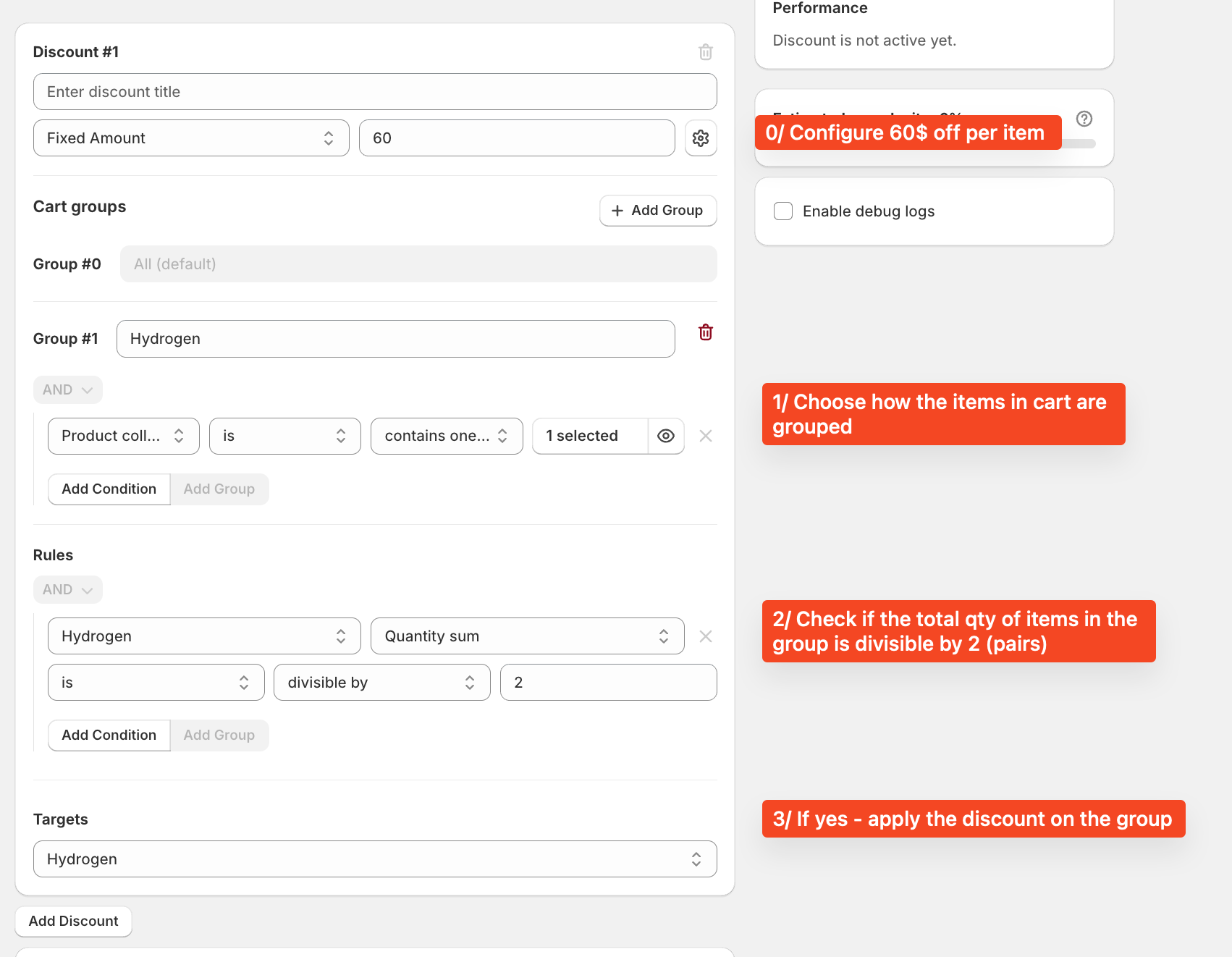
### **🟠 Step 0: Configure Discount Value**
* **Discount Type:** Fixed Amount
* **Value:** `60`\
This sets $60 off **per item**.
***
### **🟠 Step 1: Define the Cart Group**
Under **Cart groups**:
* Click `+ Add Group`
* Name the group something relevant (e.g., **Hydrogen**)
* Add a condition to define which products this group applies to:
* **Product collection** `is` → select your target collection (e.g., "Hydrogen").
This step groups the items in the cart that are eligible for this offer.
***
### **🟠 Step 2: Add Rule to Check Pair Quantity**
Under **Rules**:
* Select the group name (e.g., **Hydrogen**)
* Choose:
* **Quantity sum**
* **is divisible by**
* `2`
This ensures the discount applies **only when the total quantity in the group is in pairs** (2, 4, 6, etc.).
***
### **🟠 Step 3: Set the Discount Target**
Under **Targets**:
* Choose the same group (e.g., **Hydrogen**)
This applies the $60 discount **per item in the group**, but only when purchased in valid pairs (as defined in Step 2).
***
### ✅ Final Outcome
If a customer buys:
* **1 item** → No discount.
* **2 items** → $60 off per item = $120 off total.
* **4 items** → $240 off total.
* And so on...
***
### 🔍 Pro Tip
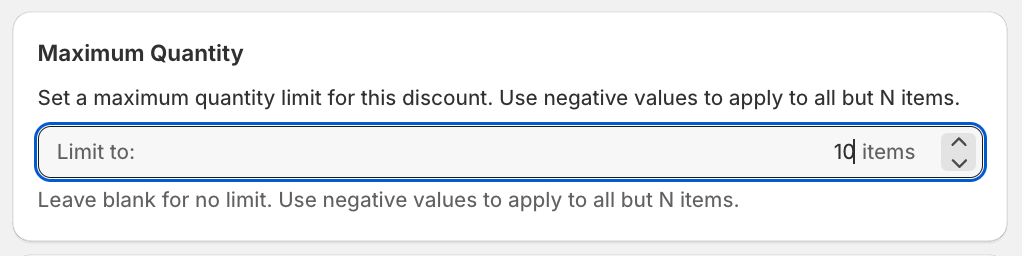
Set up a maximum quantity limit to ensure that the discount is only given up to a certain extent. For example, if you want only 10 items to get the discount at any point - you can just input 10 into the max quantity field showcased below