Cart groups, redemption rules & rejection messages
Every discount card on a marketplace reward carries its own eligibility engine: cart groups name the parts of the cart you care about, redemption rules decide when the code can be used, and rejection messages are what the customer reads at checkout when it can't. This page covers all three.
Cart groups: name the parts of the cart
A cart group is a named selection of cart lines. Groups do two jobs: they scope conditions ("the customer must have $50 of serums in the cart") and, for product discounts, they scope the target ("the discount applies to the serums").
Click Add cart group on a discount card.
Name the group (e.g. "Premium products"). Customers see this name in reward descriptions and checkout messages, so write it for shoppers, not for yourself.
Select by: Products, Collections, or Variants, then pick the items. Switching the kind clears the previous selection. A group with nothing selected matches every line.
The list always starts with All (default), the built-in group that matches the entire cart. With no groups of your own, discounts and conditions simply work cart-wide.
Discount applies to (product discounts)
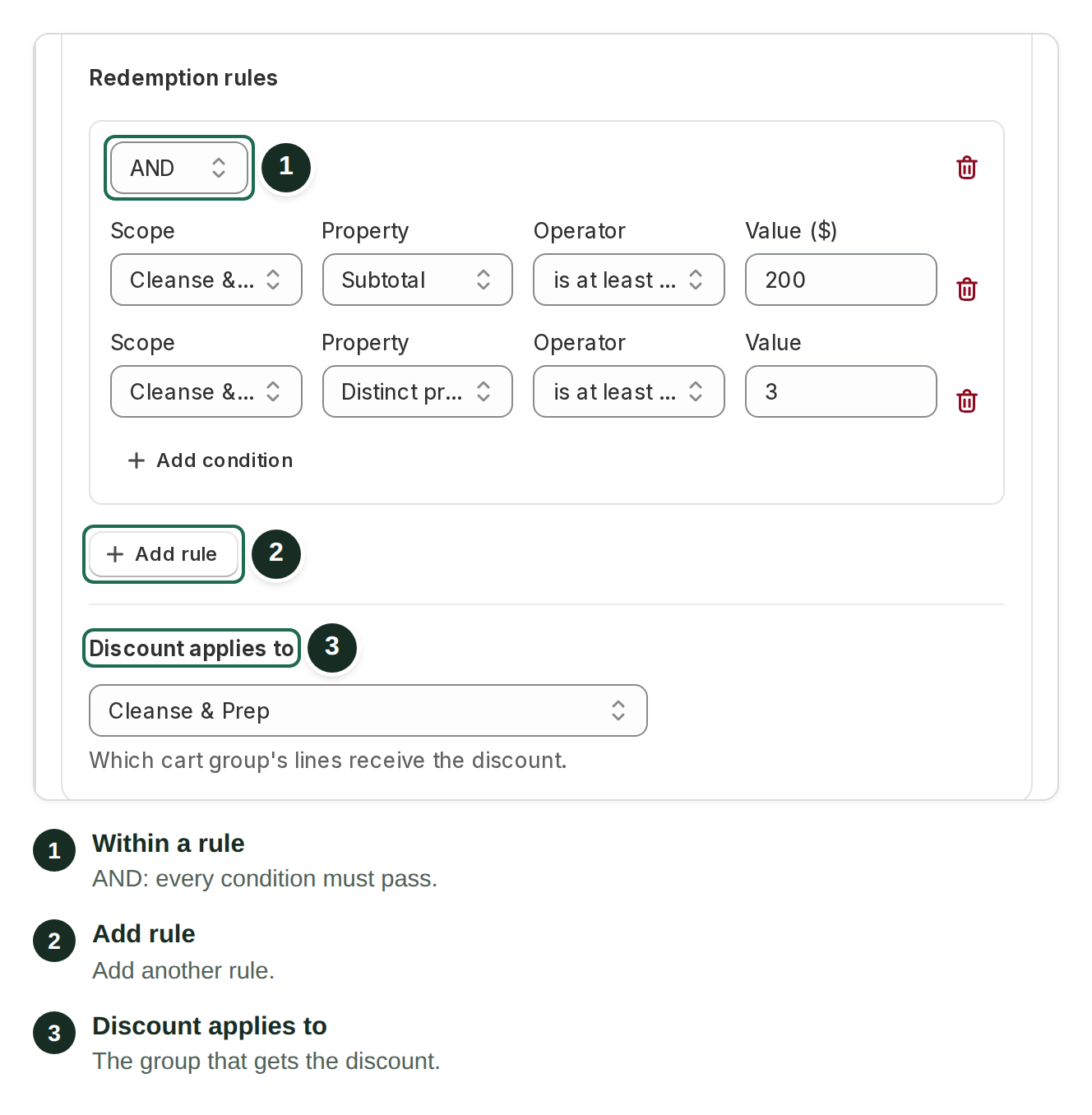
A product discount with no cart groups applies to all products. Once you've created groups, the Discount applies to selector chooses which group's lines actually receive the discount: All products or one named group.
Groups and targets are independent: a condition can test one group while the discount targets another. "Spend $50 on Cleanse & Prep, get 20% off Treat & Restore" is two groups, one condition, one target.
Redemption rules: when the code can be used
With no rules, a code can always be redeemed. Rules gate it. Each rule is a small card holding one or more conditions; click Add rule to create one, Add condition to grow it.
Each condition has four parts:
Scope
Whole cart, or any cart group you've created
Property
Subtotal, Quantity, or Distinct products
Operator
is at least (β₯), is more than (>), is at most (β€), is fewer than (<), equals (=)
Value
The threshold. Subtotals are measured in your store currency.
Two AND/OR switches control how things combine:
Within a rule: AND means every condition in the rule must pass; OR means at least one must.
Between rules: when you have several rules, a second AND/OR pill decides whether all rules must pass or any one of them is enough.
That two-level structure covers most real gating. A minimum order value is one rule with one condition (Whole cart Β· Subtotal Β· is at least Β· 50). "Either $100 in the cart OR 3 serums" is two rules joined by OR.
Worked example
To require $50 of skincare before a "20% off serums" code works:
Create cart group "Skincare" (a collection) and cart group "Serums" (selected products).
Set Discount applies to β Serums.
Add a rule with one condition: Scope Skincare Β· Subtotal Β· is at least (β₯) Β· 50.
The customer preview's "Redeem terms" section restates your rules in plain language, so you can sanity-check what shoppers will be told.
Rejection messages: what customers see when a code doesn't apply
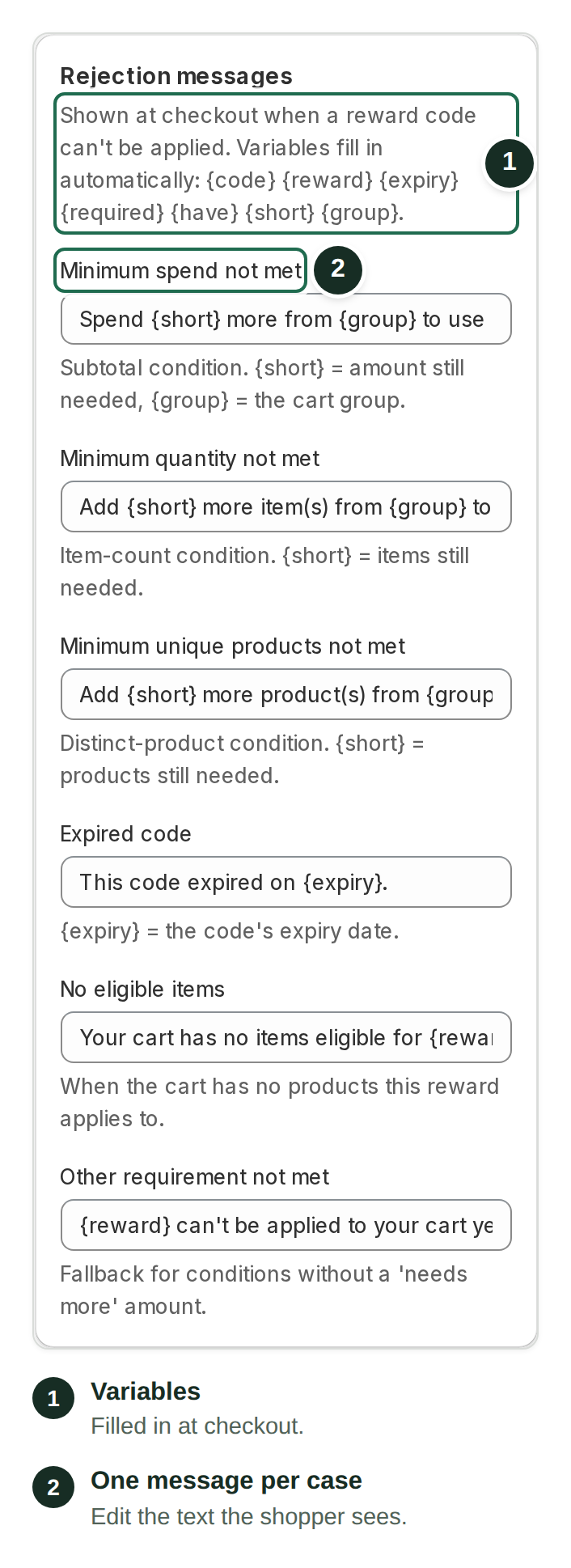
When a code fails its rules at checkout, Shopify shows the shopper a message you control. The Rejection messages panel (right column of the Reward marketplace page) holds one template per failure case. These are global: every reward shares them.
Minimum spend not met
Spend {short} more from {group} to use {reward}.
A subtotal condition failed
Minimum quantity not met
Add {short} more item(s) from {group} to use {reward}.
An item-count condition failed
Minimum unique products not met
Add {short} more product(s) from {group} to use {reward}.
A distinct-products condition failed
Expired code
This code expired on {expiry}.
The code's baked-in expiry has passed
No eligible items
Your cart has no items eligible for {reward}.
The cart has no products the reward applies to
Other requirement not met
{reward} can't be applied to your cart yet.
Fallback for conditions without a "needs more" amount (e.g. "at most" limits)
Variables fill in automatically: {code} {reward} {expiry} {required} {have} {short} {group}. The most useful are {short} (how much is still needed), {group} (the cart group's customer-facing name), and {reward} (the reward's title). This is why group names matter: "Add 2 more product(s) from Skincare" reads well; "(unnamed group)" doesn't.
Tips
Name every group. Group names surface in reward descriptions and rejection messages.
Prefer "at least" conditions. They produce helpful "add {short} more" messages; "at most" and "equals" fall back to the generic message.
Keep rules per class in mind. Cart groups and rules live on each discount card, so a reward granting a product and an order discount can gate each differently.
Test the unhappy path. Claim a reward with a cart that fails the rules and read the checkout message a customer would see.
Related articles
Last updated